A finished platform, not a starting point
This is not a theme you extend or a template you finish. Every screen and admin control listed below is already written, already wired to a real backend, and already running. Your work is choosing a name and a catalog — not building a checkout.
Everything arrives together
A customer app on both stores, a console your staff can run, and a backend that refuses to trust either of them — plus the tooling that puts your brand on all of it.
Customer app & web shop
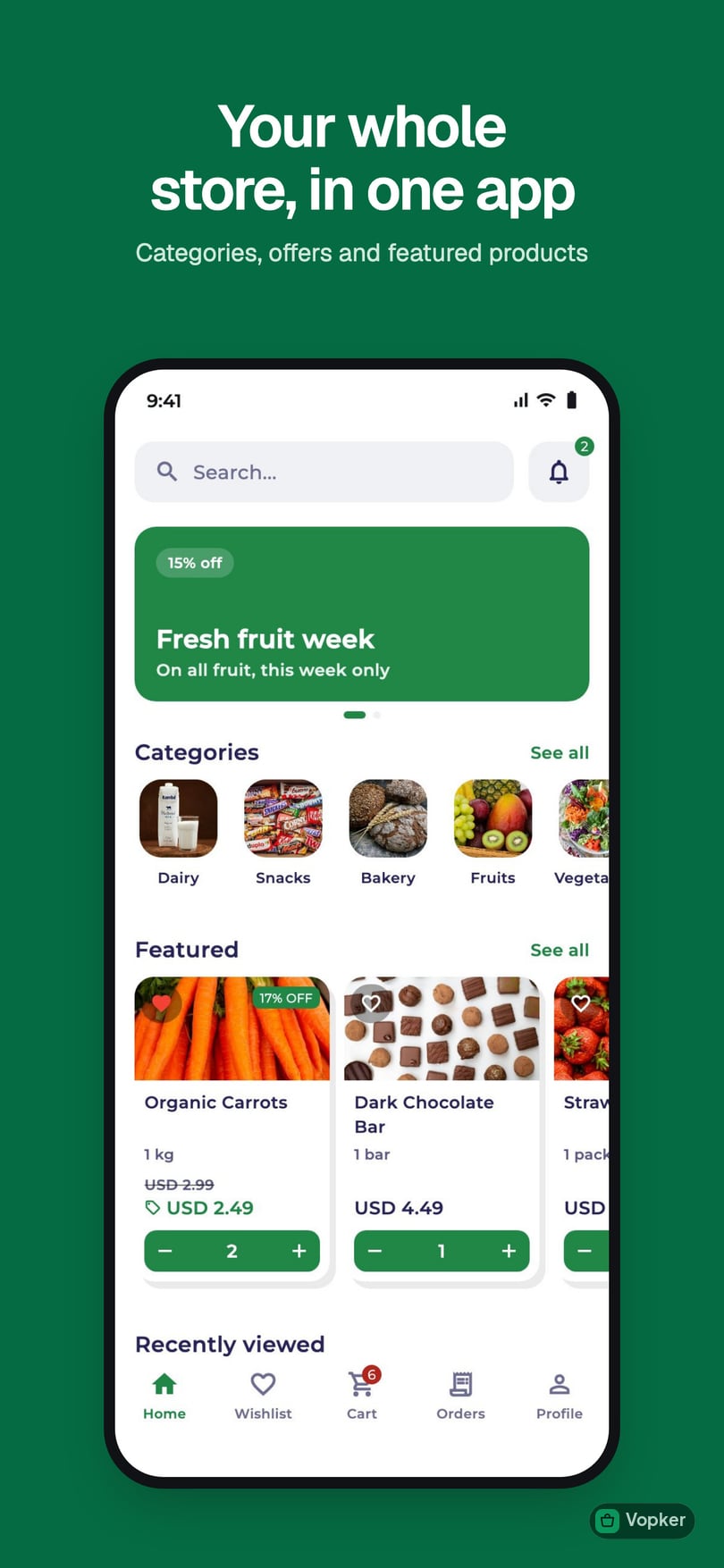
One codebase, two native builds, and a web shop on your own address that goes live first. Browsing, cart, wishlist, coupons, delivery slots, map address picking, order tracking, push notifications and dark mode — already built.
- Native iOS + Android builds
- A web shop, live in days
- Push notifications & deep links
Driver app
Scan a parcel to take it, build a run, and follow a sequenced route. Live position, a floating bubble over the map app, dispatch messaging, and an honest place for parcels that came back undelivered.
- Scan-to-claim, no dispatcher
- Sequenced multi-stop runs
- Undelivered parcels tracked
Admin panel
Products, categories, inventory, orders, customers, offers, coupons, delivery scheduling, support chat, analytics and a field-level audit log, with a role for each member of staff. Made for store staff, not engineers.
- Inline inventory editing
- Delivery capacity planning
- Staff roles & full audit trail
Cloud backend
Every price, discount, tax figure and stock level is checked on our side before an order is accepted, so nobody can change a price from their phone. Orders, stock and notifications update on their own.
- Totals you can trust
- Stock and alerts update themselves
- A safe place to test changes
White-label
Your name, colours and icons across the apps and the web shop, not a template with your logo on it. Currency, tax and delivery rules are settings your staff can change.
- Your brand throughout
- Any currency or tax model
- Your own cloud project, hosted by us
The screens your customers and staff actually use
The real product, not a design, shown with sample data — the same system described above.
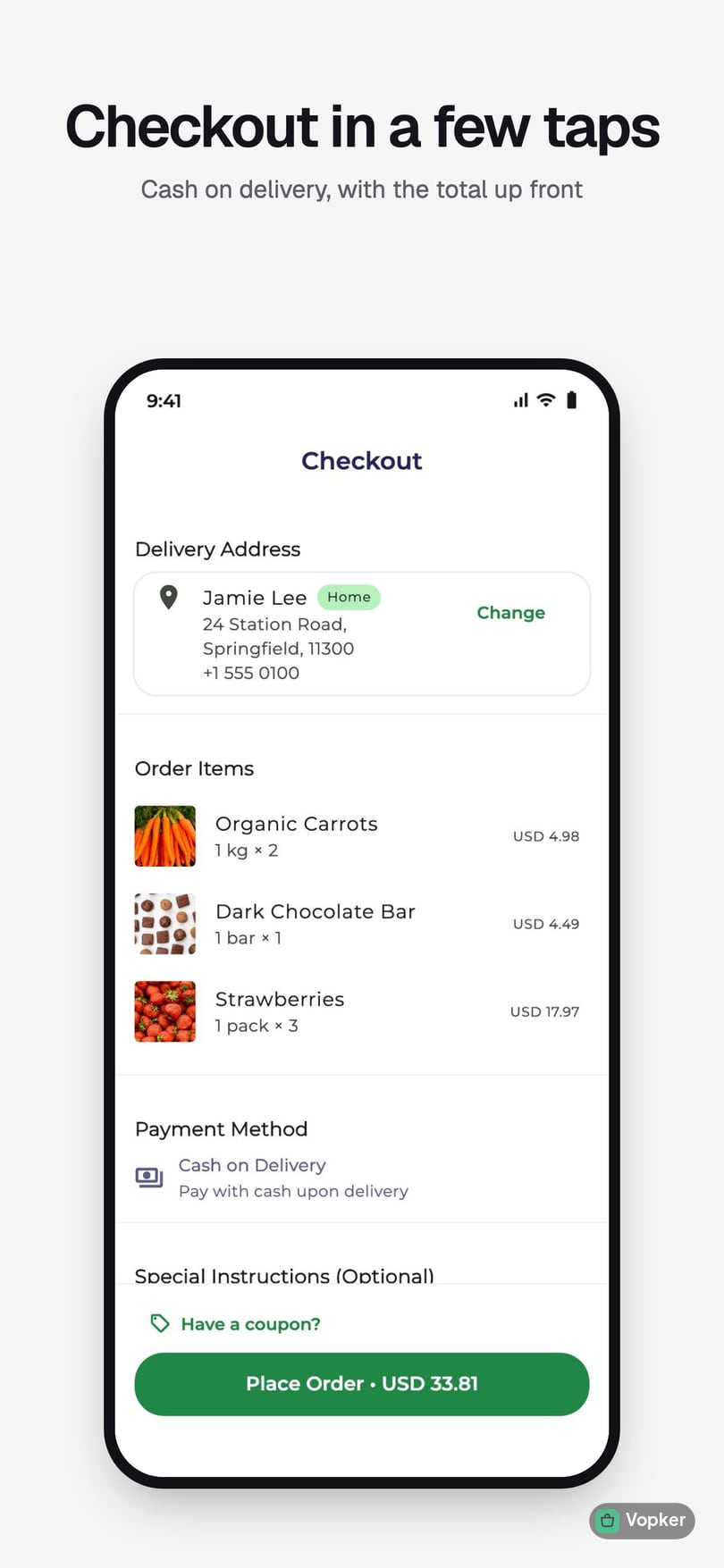
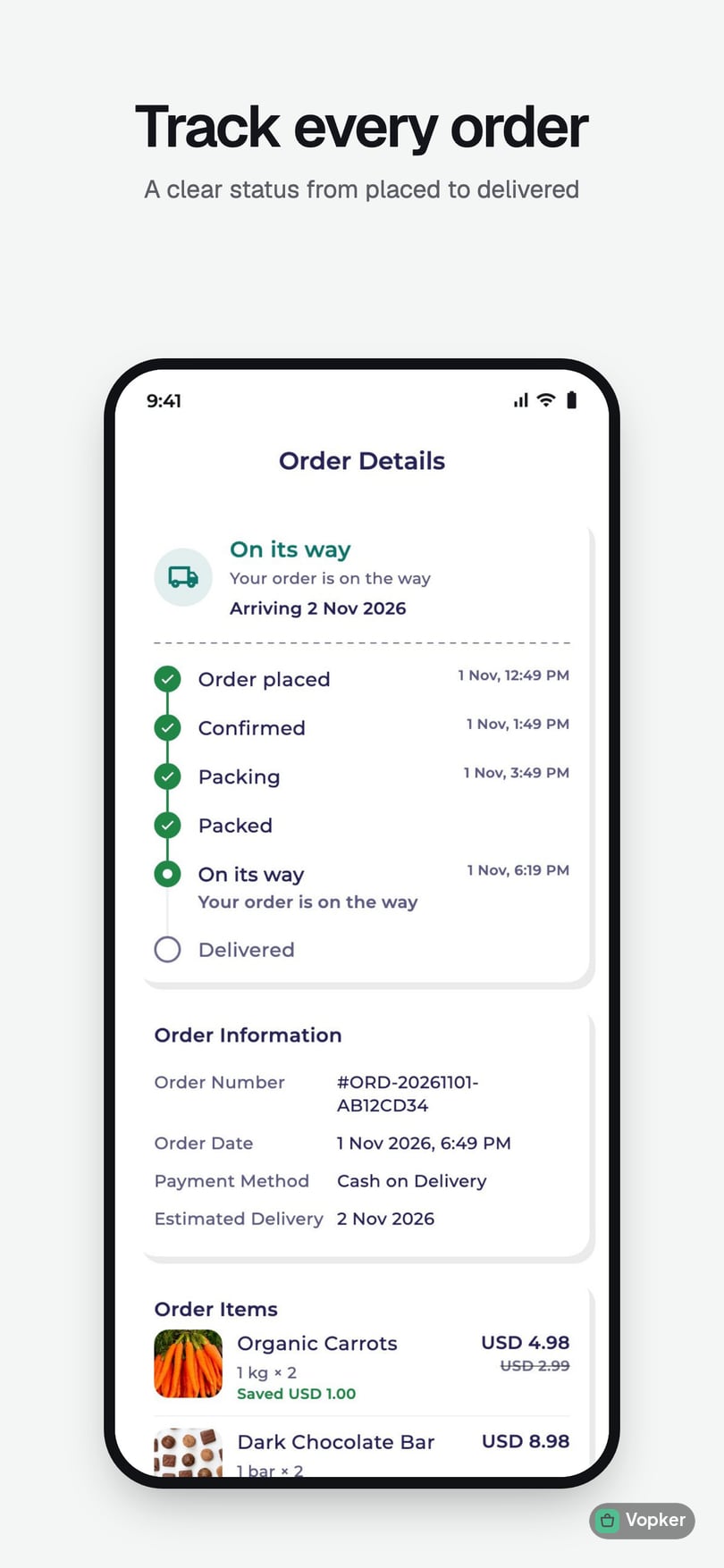
Your store in one app
Every capability, already built
Filter by product to see exactly what lands in your deploy. Nothing here is a roadmap item — it is running code you can place a real order through.
Showing 106 of 106 features across 16 areas.
Discovery & browsing
A storefront that feels native on both platforms, with the merchandising surfaces shoppers expect.
Animated branded splash
LaunchYour logo and colours from the first frame — no generic loading screen.
Onboarding carousel
LaunchA short first-launch walkthrough that introduces the store.
Home with featured rails
LaunchCategories, featured products and promo banners, all curated from the admin panel.
Product detail with zoom
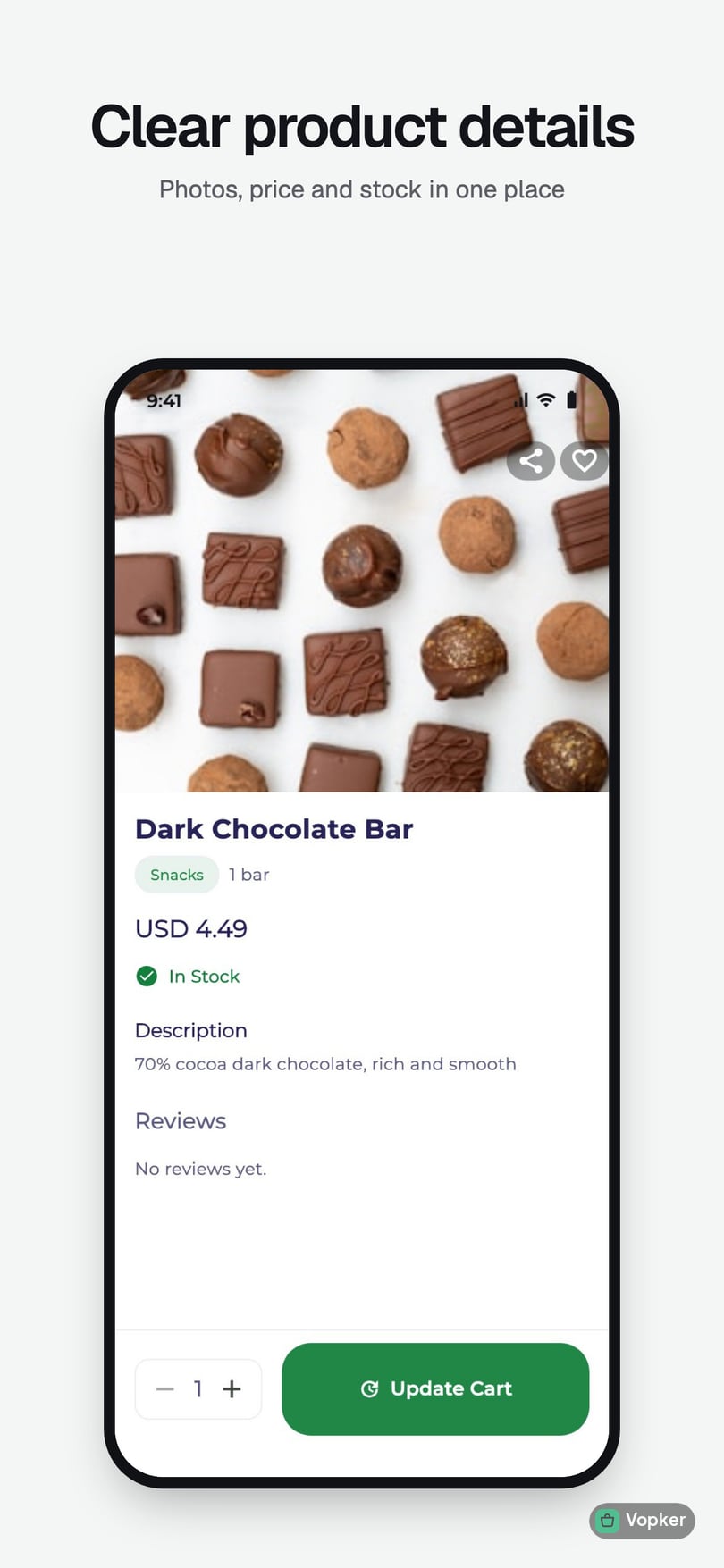
LaunchFull image gallery with pinch-to-zoom, pricing, stock and description.
Debounced live search
LaunchResults update as the shopper types, without hammering the backend.
Trending searches
LaunchAggregated automatically from real customer activity — no manual curation.
Recently viewed
LaunchA per-shopper rail that quietly raises repeat-purchase rates.
You may also like
LaunchRelated-product recommendations on every product page.
Low-stock urgency cues
Launch"Only 3 left" badges, with the threshold tunable per store.
Cart, wishlist & checkout
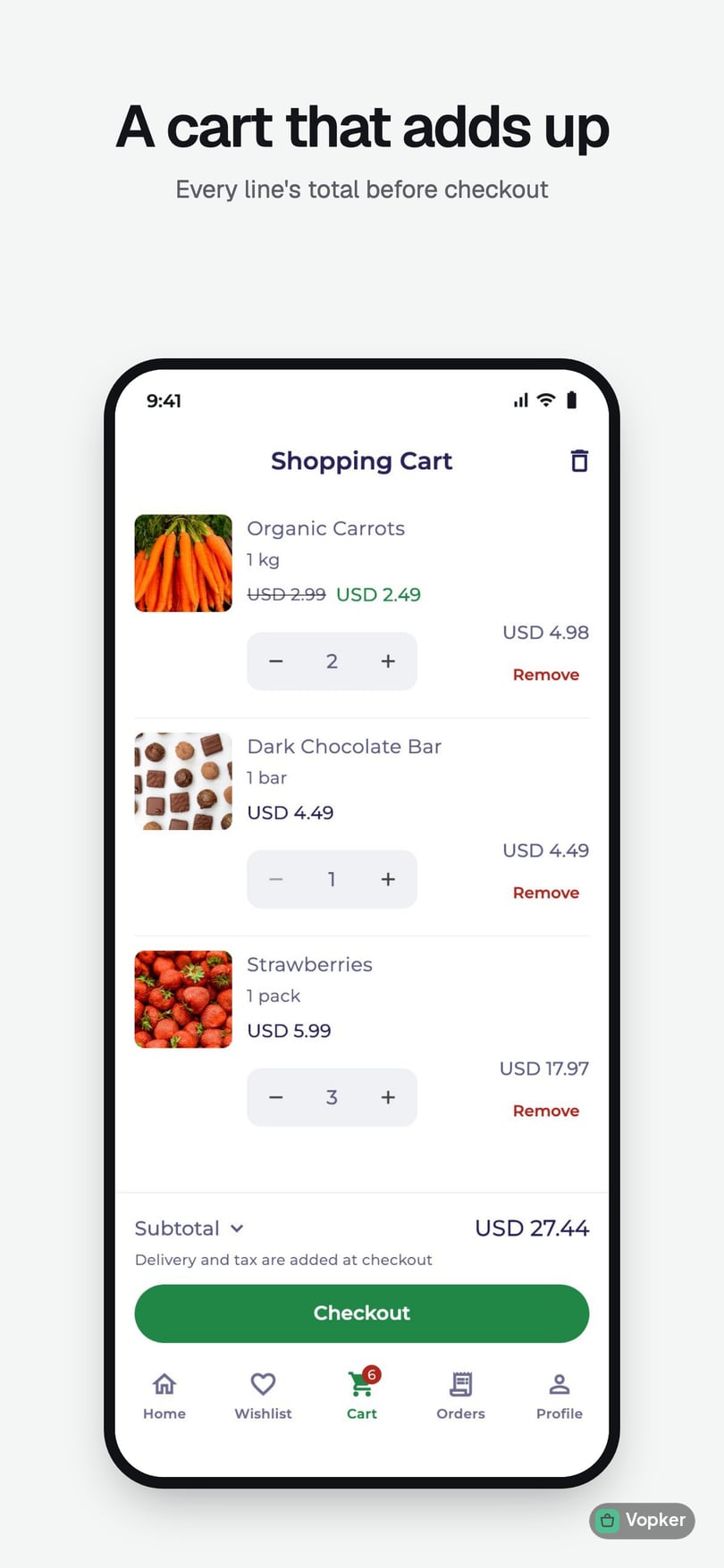
Where most templates fall apart. Every total is computed and verified on the server, never trusted from the device.
Wishlist
LaunchSave for later, synced to the customer's account across devices.
Cart with haptic steppers
LaunchInline quantity controls with tactile feedback and an animated cart badge.
Coupon entry
GrowthLive validation as the code is typed, with a clear reason when one is rejected.
Automatic offers
GrowthQualifying discounts apply themselves — nothing for the shopper to remember.
Address book
LaunchMultiple saved addresses with add, edit and default selection.
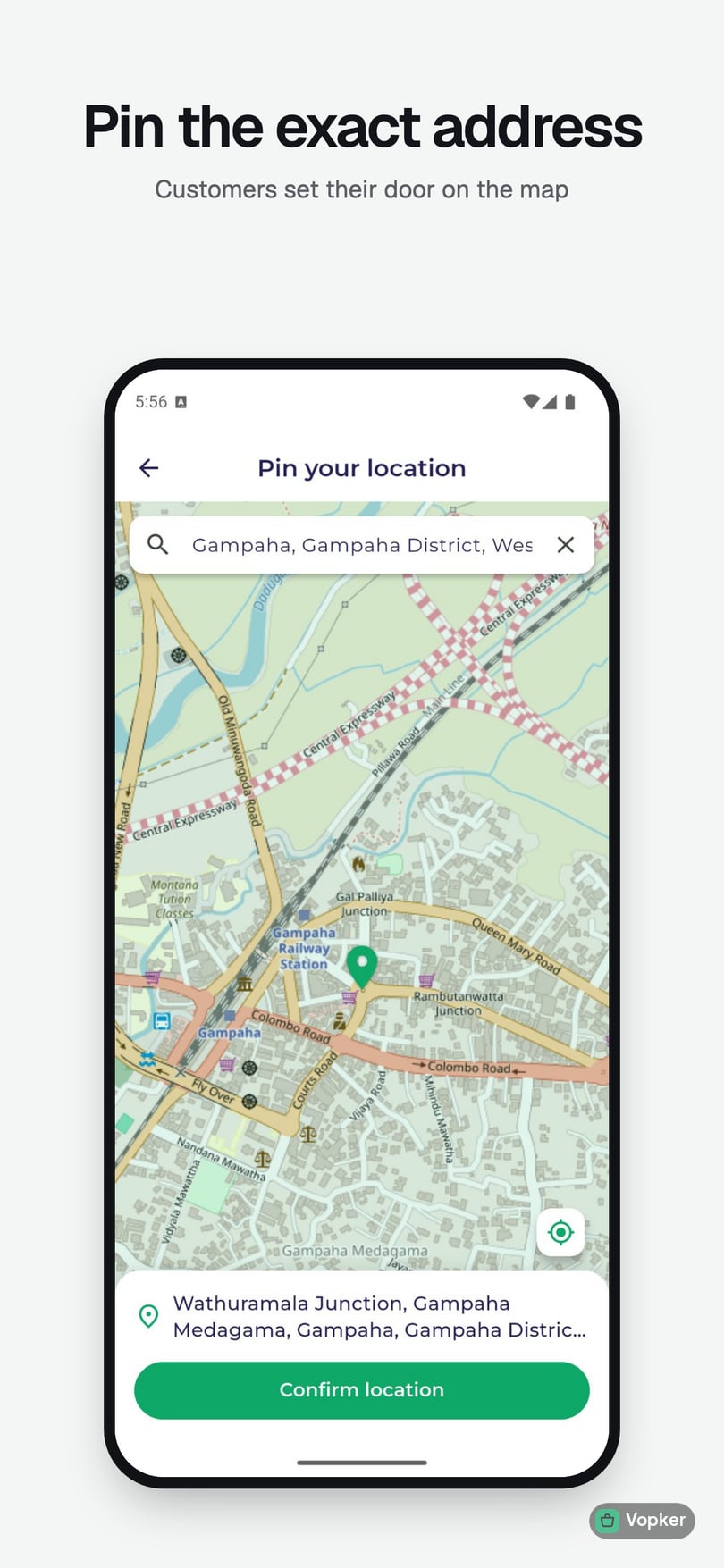
Map address picker
LaunchPin-drop address selection on a live map.
Delivery-zone geofence
ScaleDraw your service areas on a map; out-of-zone orders are blocked at checkout.
Delivery time slots
GrowthCustomers pick a window you offer. Full ones show as full, and the last few places show as the last few.
Server-validated checkout
LaunchPrices, stock, discounts and tax are all recomputed server-side before an order is accepted.
Cash on delivery
LaunchCustomers pay in cash at the door, on every plan, with a payment gateway of your choice integrated for you on top.
Email-verification gate
LaunchA verified email is required before the first order, so throwaway sign-ups can't place one.
Orders & engagement
Everything that happens after checkout — the part that turns a first order into a second one.
Order history
LaunchEvery past order, with full line-item detail and reorder context.
Status timeline
LaunchA live progress view from placed through to delivered.
Reviews & ratings
GrowthCustomers rate and review products; you moderate and reply publicly.
In-app review prompt
LaunchAsk for an app-store rating at a moment the customer is actually happy.
Transactional push
LaunchOrder confirmations and status changes delivered instantly.
Rich image push
GrowthCampaign notifications with imagery, not just a line of text.
Promotional opt-in
GrowthMarketing pushes gated behind explicit consent, so you stay compliant.
Deep linking
LaunchLinks open straight to a product, order, offer or category inside the app.
Account & experience
The quiet infrastructure that decides whether an app feels trustworthy.
Email, phone, Google and Apple sign-in
LaunchEmail with verification and password reset, plus a texted code, Google or Apple: whichever ways you choose to offer.
Profile management
LaunchCustomers maintain their own details without contacting support.
Account deletion
LaunchA self-service deletion request flow, required by both app stores.
Light / dark / system theme
LaunchRespects the device setting, or lets the customer override it.
Biometric app lock
ScaleFace ID and fingerprint locking, enabled per device and gated by your policy.
Friendly error states
LaunchEvery failure surface has a readable message and a retry, app-wide.
Offline & maintenance gates
LaunchGraceful screens when the network drops or you take the store down.
Your web shop
A shop in the browser on your own address, sharing the apps' catalogue, cart and orders, and live before the apps clear review.
Web shop on your address
LaunchBrowse, search, cart and checkout in the browser, on your own domain or one of ours.
One account everywhere
LaunchSigned in, the same cart, addresses and orders follow the customer between the app and the web shop.
Store pages
LaunchAbout, legal and help pages, written in a rich-text editor in the panel.
Home page builder
GrowthArrange the shop's home page from ready-made sections, and preview it before it goes live.
Festival themes
GrowthDress the shop and the app for a festival or a season, starting and ending on dates you set.
Your customers' languages
ScaleThe app, the web shop and the staff panel in up to eight languages; customers and staff each pick their own.
Taking a run
A third app, for the people who actually deliver. Built around a scanner and a route, not a list of jobs to accept.
Scan to take an order
GrowthScan the parcel's code, or type the six characters printed on it — no dispatcher assigning jobs one at a time.
Build a run, then start it
GrowthScan several parcels into one run and set off once, rather than accepting each delivery as it appears.
Route sequencing
ScaleStops ordered for you, then improved by a second pass that removes the long leg back across everything already covered.
Go on and off shift
GrowthDrivers control their own availability; only those on shift take deliveries.
Guided permission setup
GrowthLocation and background permissions explained and requested in one place, before the first run.
Driver accounts
GrowthCreated from the admin panel, with password reset and suspension — no self sign-up.
Out on the road
What happens between leaving the shop and getting back, including the part most systems pretend does not happen.
Current run screen
GrowthThe next stop, the ones after it, and the customer's details for each.
Floating bubble
GrowthThe current stop stays on screen over the map app, so the driver is not switching back and forth.
Background location
GrowthPosition reported while a run is active, throttled by distance and time so it does not drain a battery or a bill.
Parcels carried back
GrowthA delivery that could not be made is flagged with a reason and tracked as still in the van — not quietly marked done.
Message dispatch
GrowthA direct line to the desk, plus broadcasts the shop sends to every driver on shift.
Past deliveries
GrowthWhat the driver has completed, with the cash collected against each.
Cash handed back
GrowthThe cash a driver collected is handed over at the desk and matched against every delivery it came from.
Catalog & inventory
A web console your store staff can run without ever seeing the code.
Sales dashboard
LaunchRevenue, orders and insight at a glance the moment you sign in.
Product management
LaunchCreate, edit, delete, upload images and flag products as featured.
Category management
LaunchOrganise the catalog into the structure your customers browse.
Inline inventory edits
LaunchChange price and stock directly in the table — no dialog round-trip.
Low-stock alerts
LaunchFilter and flag anything under your configured threshold.
Merchandising
Run promotions without a developer in the loop.
Offers
GrowthAutomatic discounts that apply themselves at checkout when conditions are met.
Coupons
GrowthCodes with limits, expiry and eligibility rules you control.
Redemption tracking
GrowthSee exactly who redeemed what, and when — per offer and per coupon.
Orders & customers
The daily operating surface for whoever runs the store.
Order lifecycle
LaunchMove orders through the full status flow with one click per step.
Stock-shortage alerts
LaunchGet warned at confirmation time if an order can't actually be fulfilled.
Cancellations with restock
LaunchCancel with a recorded reason and automatically return stock to inventory.
Customer management
LaunchView, activate and deactivate customer accounts.
Customer detail
LaunchOrder history, lifetime spend, most-viewed and most-purchased items.
Deletion processing
LaunchWork through account-deletion requests with a compliant audit trail.
Staff roles
LaunchPicking, dispatch, delivery, supervisor or super admin: each person sees only the screens their job needs.
Customer support
Answer customers where they already are, without a separate helpdesk.
Live support chat
GrowthCustomers chat with your staff from the app and the web shop, in the hours you set, with saved quick replies.
Help tickets
GrowthQuestions that need follow-up become tickets, with a reply target, internal notes and saved replies.
Order emails from your address
GrowthOrder confirmations and updates sent from your own mailbox, in templates you edit.
Delivery scheduling
How many deliveries you can actually make, and when — so a Saturday morning stops taking orders once the vans are full.
Weekly delivery windows
GrowthSet the windows you run on each weekday, and how many orders each one takes.
Capacity that holds
GrowthA window stops being offered once it is full. Enforced when the order is placed, not just hidden in the app.
Delivery calendar
GrowthDay, week and month views showing every window and how full it is, on one time axis.
Orders behind a window
GrowthClick a slot to see exactly which orders are in it.
One-off exceptions
GrowthClose a public holiday, or add an evening round for one Friday, without touching the weekly pattern.
Copy a day across the week
GrowthApply one day's windows to the weekdays, the weekend, or any days you pick.
Slot column and filter
GrowthSort and filter the order list by the window each delivery is booked into.
Engagement & insight
Know what happened, and who did it.
Review moderation
GrowthApprove, hide or publicly reply to any customer review.
Push composer
GrowthCompose rich campaign notifications with imagery and deep-link metadata.
Notification history
GrowthEvery campaign sent, with one-tap resend.
Targeted campaigns
GrowthSend promotional pushes only to the segments that opted in.
Analytics
GrowthRevenue, average order value, orders by status, cancellation rate and new-user growth.
Field-level audit log
ScaleEvery admin action recorded, down to which field changed from what to what.
Configuration
The settings that mean you never need a code change to enter a new market.
Pricing settings
LaunchDelivery fee, free-delivery threshold and tax model, all editable live.
Inventory thresholds
LaunchTune when low-stock warnings and urgency cues appear.
Security policy
ScaleSet whether biometric lock is required, and how quickly it re-arms.
Delivery-zone editor
ScaleDraw, name, enable and disable multiple service areas on a map.
Maintenance mode
LaunchPause the customer app during a migration or a stock-take.
Server-authoritative core
The difference between a demo checkout and a system you can take money through.
Validated order creation
LaunchPricing, stock, offers and coupons are all re-verified server-side before an order exists.
Cart & coupon validation
LaunchDedicated endpoints so the app never has to be the source of truth.
Offer calculation
GrowthDiscount logic runs on the server, identically for every client.
Cancel with restock
LaunchCancellation atomically returns inventory, with no manual reconciliation.
Slot capacity reservation
GrowthA delivery window's last place is taken inside the order transaction, so two customers cannot both get it.
Your shop's timezone
Launch"Monday, 9am" means 9am where you are — not where the server runs, and not where the customer is.
Event tracking
LaunchProduct views and cart adds recorded server-side, powering the analytics.
Automated triggers
LaunchOrder events, review aggregation, trending searches and abandoned-cart cleanup, all automatic.
Database-level access rules
LaunchData access enforced at the database layer, not just in the app.
Tested before release
LaunchEvery update runs on our own test setup first, before it reaches any store.
Rebranding & delivery
One configuration file drives the name, colours, icons and bundle identifiers across the apps and the web shop.
Full visual rebrand
LaunchName, logo, splash, colour palette and typography applied everywhere at once.
Region & currency
LaunchAny currency symbol or ISO code, set from the admin panel.
Tax & delivery config
LaunchFlat or itemised tax, delivery fees and free-delivery thresholds.
Per-client environments
LaunchEach store runs in its own cloud project, separate from every other brand.
Admin user manual
LaunchA complete non-technical guide you can hand to store staff on day one.
Deployment guides
LaunchDocumented setup, so your team is never dependent on a single person.
Which plan unlocks what
Every feature above carries the tier it belongs to. Launch is a real store you can sell through on day one; each tier above it adds reach rather than replacing anything.
Launch
Get a real, branded ordering app in front of customers.
Growth
Everything you need to actually run and grow the store.
Scale
Multi-brand operations, deeper control, and a contract to match.
Stop reading the list. Place an order.
We will brand a build for your store, hand you an admin login, and let you run a real order through it end to end. That is a far better answer than any feature table.